Cookies
Background
Cookies store a small amount of data in the users browser. Cookies can be blocked by the browser and should not be used to store sensitve data. A good use case for cookies would be storing non-essential user settings such as a selected theme style.
As Cookies are stored in the browser the HTTP request and response are used to get and set the cookie.
A Cookie is with set with:
A Cookie value is retrieved with:
The Initial GET Controller Action
We'll create a simple page that can be used to set a favourite colour value in a cookie.
In the Controllers/HomeController add the first action as follows:
The Controller checks to see if a cookie Colour has been created. If so it is added to ViewData for display in the View. If not, then a default value of 'red' is used.
Create the View
The following View displays the value of ViewData["myColour"]. There is also a HTML form to allow the user to pick a colour.
Note the use of the asp-for tag helper than is used to set the selected attribute on the option tag whose values matched that in ViewData["myColour"].
Action Post Controller
We now need a HtttPost Action for our form. This receives the values from the form via the parameter IFormCollection form. The value is assigned to the newColour string variable.
A CookieOptions object is created and an Expires value of 10 minutes created.
The new cookie named Colour is created with the newColour value and cookie options.
Checking the Cookie has been Created
To view the Cookie in Google Chrome use the Application Tab in the Chrome Inspector.
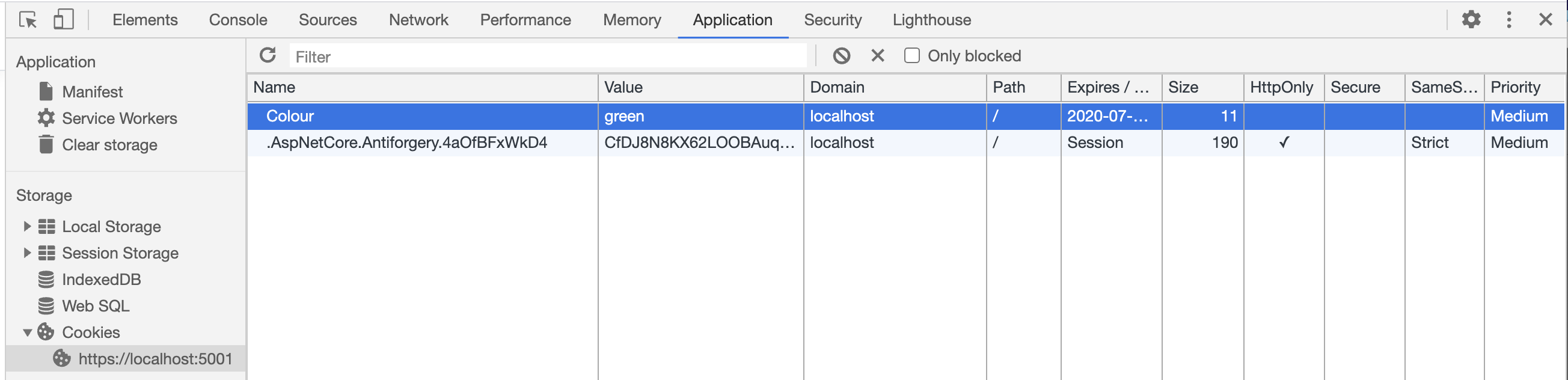
Using the Cookie in another View
To use the cookie value in another View of the application is now a case of retrieving the cookie value in the controller. For Example, in a Controller add:
Then create a View: