Sessions
Background
Sesssions are a way that data can be maintained across an application. Unlike Cookies where the actual data is stored in the users browser, with Sessions the data is stored server side. However, a Cookie known as a Session Cookie that holds the identify to that data is still created. Sessions are commonly used to enable users to stay logged into an application.
Setting up an application to use Sessions is done in the Startup.cs within the ConfigureServices() method.
Then apply the session to the middleware with:
Order here is important. Place the app.UseSession() before UseEndpoints().
Setting and Getting Sessions Values
Session values are set with:
Session values are retrieved with:
The Initial GET Controller Action
We'll create a simple page that can be used to set a our name as a session value.
In the Controllers/HomeController add the first action as follows:
The Controller checks to see if a session value named Name has been created. If so it is added to ViewData for display in the View. If not, then a default value of 'Not Set' is used.
Create the View
The following View displays the value of ViewData["myName"]. There is also a HTML form to allow the user to enter their name.
Action Post Controller
We now need a HtttPost Action for our form. This receives the values from the form via the parameter IFormCollection form. The value is assigned to the newName string variable.
A new Session variable of Name is set using the setString() method.
The new value is then returned to the View via ViewData.
Checking the Session has been Created
To view the Cookie that controls the Session in Google Chrome use the Application Tab in the Chrome Inspector. The cookie is called AspNetCore.Session and will have a key value associated with it. It is this key that the server uses to retrieve the sessions values.
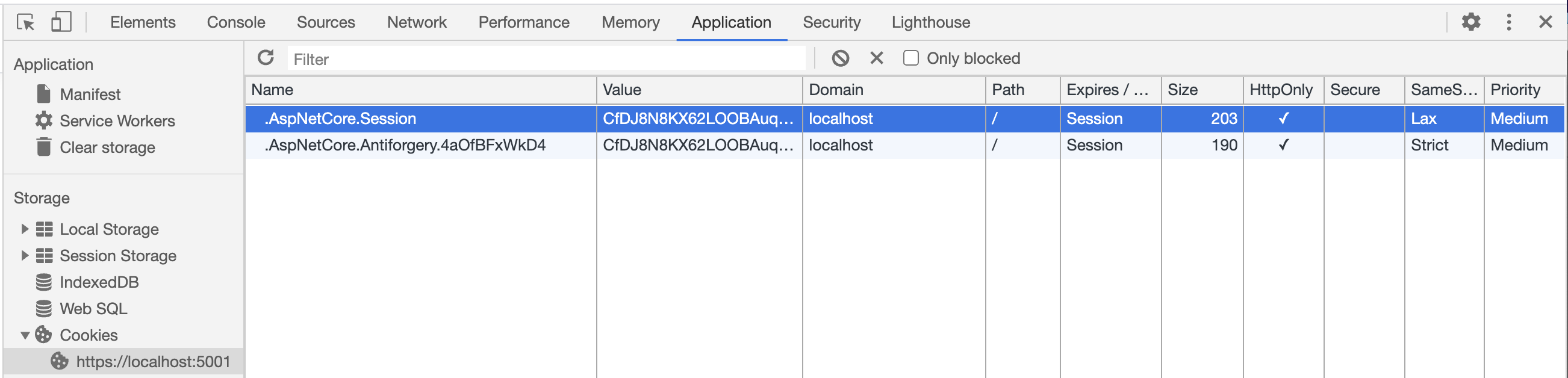
Using the Session in another View
To use the session value in another View of the application is now a case of retrieving the session value in the controller. For Example, in a Controller add:
Then create a View: