

API Scaffolding in a MVC Application
Scaffolding API Actions with Entity Framework
We can also use Visual Studio scaffolding feature into a MVC project. This will create a Controller with actions relating to the core RESTful calls.
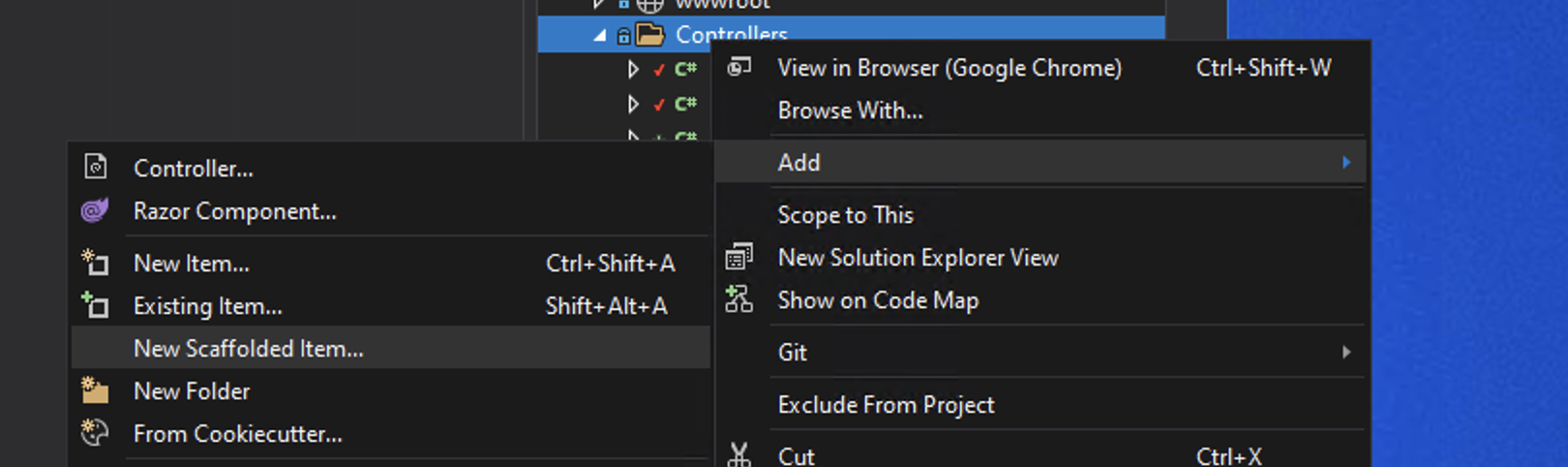
To start the scafolding in the Controllers folder right-click to add new content and choose New Scaffolded Item.
Next choose API Controller with actions, using Entity Framework:

We next choose the Model class we would like API Endpoints for and the Data context class (the DbContext) to use. We can also set a Controller name but a sensible one is picked from the model selected.

Exploring the Scaffolding Code
The Controller has the attributes:
A technique known as Attribute Routing is used to creates routes of localhost:5000/api/Films for each of types of HTTP requests.
The [ApiController] attribute indicates that the controller responds to web API requests.
ASP.NET was designed for modern web experiences. Endpoints automatically serialize your classes to properly formatted JSON.
Notice that the controllers uses ControllerBase not Controller. As Controller derives from ControllerBase and adds support for views, it is not needed for web API requests.
The Controller references the DbContext by using dependency injection to inject the context into the constructor function.
The first action it creates will get all the data.
It has a [HttpGet] attribute identifying the action as one that supports the HTTP GET method.
The method is going to run a query against the DbSet() of Films using the ToListAsync() method. This is an asynchronous version of the LINQ Extension Method ToList(). This will return an IEnumerable non-generic collection, specifically a collection of Film objects.
Notice that the public method of GetFilms has a more complex return type that the IActionResult we have more frequently seen.
That is because this action is an asynchronous method.
Asynchronous Actions
By asynchronous we mean "not at the same time". In programming many applications are synchronous in that processes run one after another. A process further down the sequence can be "blocked" by a time consuming process higher in the list.
With asynchronous programming tasks can be set off to run independently and report back once completed. So the tasks are running "not at the same time".
As tasks run at different times the programme will needs to know when a task has finished. In Javasript this takes the form of a Promise. In C# we have a Task. A Task represents the ongoing work and can tell us when it is completed.
With a Task we have a couple of other keywords (the same as in asynchronous Javascript) async and await.
These are syntactical sugar designed to make writing asynchronous code easier to read. The async keyword is used to prefix a function to indicate that it is asynchronous. The await keyword is used as a prefix to create a non-blocking task. A function must be async in order to use await.
So in summary the action:
... is build from:
public- Access Modifier
async- Indicates asynchronous method
Task- The return type is an Object for asynchronous operations
ActionResult- The result of the action
IEnumerable- A collection of objects
Film- In this example the type of object in the
IEnumerablecollection
You start a task and hold on to the Task object that represents the work. You'll await each task before working with its result.
Why asynchronous?
Visual Studio has scoffolded this as asynchronous but it could equally have been written synchronously as:
Why did Visual Studio use asynchronous? An API may be expected to deal with a lot of calls and having those calls use up resources by blocking other processes may be detrimental to the efficiency of the application. There are lots of variables at play here and either technique will work.
The above is to do with the asynchronous of the server threads not the client/browser. We use asynchronous Javascipt on the client side to stop the Javascript blocking - ie allowing the browser to perform other Javascript tasks. On a webbserver we're unlikely to hit the blocking so the choice of asynchronous Actions is mute.
Output
Notice that although based on the Model which has capitalized names, the JSON produced by the Scaffold APIs is converted to camelCase.

This is because the return of the actions are automatically serialize to JSON.
The API Controller in Full
For completeness here is the full Controller produced in this example: