

Working with Views and Controllers for Routing
Explore the Views folder
When setting up a basic MVC from the Visual Studio Template it will provide two views - Index and Privacy.
These views are constructed from a layout template found at Shared/_Layout.cshtml.
The use of the Shared/_Layout.cshtml template is dictated by the _ViewStart.cshtml at the root of Views/.
Explore the Index page
The Views/Home/Index.cshtml contains some HTML and some c# code. The c# code sets the ViewData["Title"] value used to set the HTML <title> element in the page. Open Shared/_Layout.cshtml to see where this value is used in the template.
Explore the Controller
The default MVC set up creates a Controllers/HomeController file. This files 'controls' both the Index and Privacy views through two methods with names that match the views.
Public methods on a controller (except those with the [NonAction] attribute) are described as Actions. Actions can return anything, but frequently return an instance of IActionResult that produce a response. The action method is responsible for choosing what kind of response. Both of the above return Views. The View returned is the one that matches the name of the method.
Action Results
The starter project provides two public methods in the Controller/HomeController.cs. Both actions have a result return type of IActionResult. This is an Action Result.
Action Results represent things the application will do as a result of the Controller Action been called. Common Action Results returns are:
View()The Action Result is the corresponding View (see below).
RedirectToAction()The Action Result is to redirect to another action in the application.
Json()Serializes object into JSON. Used for Endpoints.
Ok()Great for testing. Simple HTTP response status code of 200 and string as payload.
Understanding Routing in MVC
How a View is selected by the Controller is known as routing. The URL request made is picked up by the controller and 'routed' to a view. The specifics for this was set out in the pattern defined in the startup.cs file and the app.UseEndpoints middlware method.
The pattern values dictates how a HTTP request is routed by looking for a controller and action inside that controller (there can also be an option parameter id). As such a call to https://localhost:5001/Home/Privacy is passed to the Controllers/HomeController and the Privacy() action called, that in turn calls the Views/Home/Privacy.cshtml view.
Lets put this in table format:
| URL Called | Contoller Called | Action / Method Called | View Used |
|---|---|---|---|
| localhost:5001/Home/Privacy | Controllers/HomeController.cs | Privacy() | Views/Home/Privacy |
| localhost:5001/Home/Index | Controllers/HomeController.cs | Index() | Views/Home/Index |
Naming conventions are important here. The HomeController will look for views in Views/Home
Note there are default values. The starter template set up Home as the default controller and Index as the default action. Therefore the home page can be called various ways:
| URL Called | Contoller Called | Action / Method Called | View Used |
|---|---|---|---|
| localhost:5001/Home/Index | Controllers/HomeController.cs | Index() | Views/Home/Index |
| localhost:5001/Home/ | Controllers/HomeController.cs | Index() | Views/Home/Index |
| localhost:5001/ | Controllers/HomeController.cs | Index() | Views/Home/Index |
Experiment with Controllers and Views
Creating a new Route for the Home Controller
Create a new method in the Controllers/HomeController for a view called News.
You will need to create a new view called News.
This can be viewed at https://localhost:5001/Home/News
Creating a new Controller with its own routes
As demonstrated above many views can be controlled by the same Controller file. However, as your application expands you may choose to create multiple controllers that create views within another route.
Create a new Controller called Controllers/NewsController.
If you test the above by attempting to visit https://localhost:5001/News/ then an error is thrown.
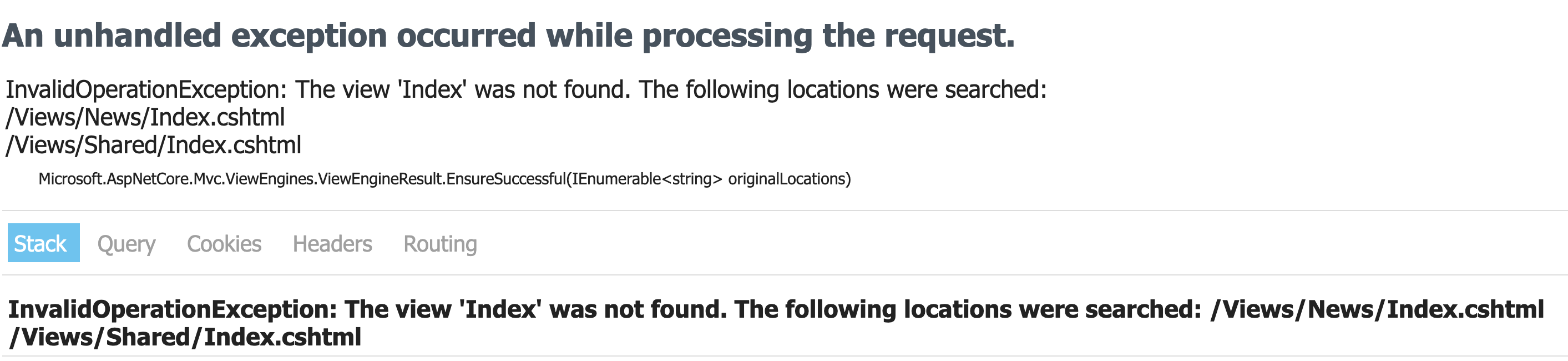
To fix this error create view file at Views/News/Index.cshtml.
Try creating another view for the Controllers/NewsController
Using the Ok Method with Controllers
Actions can be tested without Views using the Ok method. Try adding an action of:
This can be tested with https://localhost:44354/Home/ActionTest.