

Building a Join Query
In Relational Databases, queries across tables 'joins' are common place. This document will show how you can use Entity Framework to create tables from Models that will automatically add any necessary Foreign keys.
The simple scenario to explore is a Students table that has a ModuleId field as a foreign key. It is in the table Modules that ModuleId is the primary key in a table .
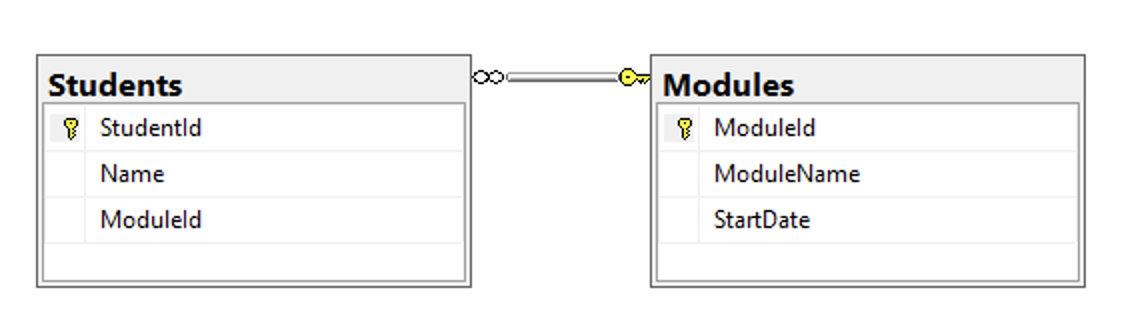
The Module Model
First create a Model Models/Module.cs that via DbContext and DbSet will be used to build the Modules table.
The Student Model
Next create a Model Models/Student.cs that via DbContext and DbSet will be used to build the Students table.
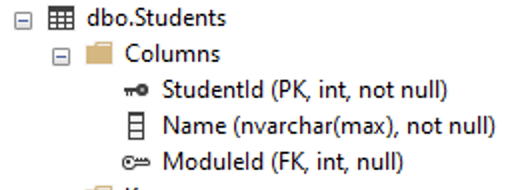
Note that the Module property is of type Module. When the models are migrated this will become a foreign key of ModuleId in the Students table.
Option One: Edit an Existing DbContext
If you already have a DbContext class (ie ApplicationDbContext) then edit it to add the two new tables via DbSet() as follows:
Hide the existing models from Migration. The example below excludes a model of Film with a DbSet of Films:
Create a Migration Console
Use the console to run the migration command and then update the database.
... then update the database.
Option Two: Create a new DbContext
Alternatively create a new DbContext class (ie Models/JoinDbContext) to add the two new tables via DbSet() as follows:
Ensure you add the new DbContext to the Startup.cs
Now you can run a context specific migration. Note the use of the -context flag in both commands.
... then update the database with just the JoinDbContext.
Review the Tables and Add Some Data
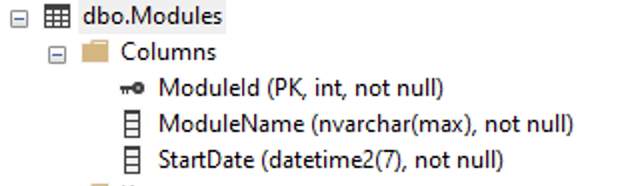
If the migration runs successfully the tables should now appear in the database. The Module table structure will be as follows:
The Student table structure will be as follows:
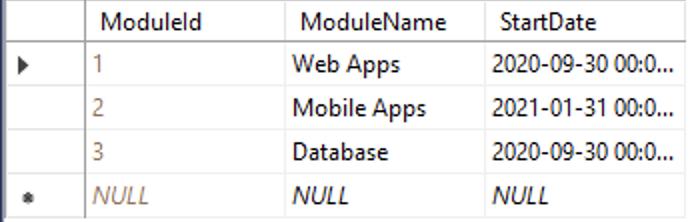
Populate the two tables with some data. Notice that Student.ModuleId value must match a value in the Module table.
The tables will now appear as follows:

Amend the Student Module
Now the Student table has been created for our join the two fields must match. As such amend the Student Model, renaming the Module property to be ModuleId.
Build a Model for the Join Query
Create a new Model Models/StudentModule.cs that includes the fields from both tables that you'd like to extract. This will make sending the data to the View easier.
No table is created from this model so no need to migrate.
Build an Action in the Controller
Amend the controller Controllers/HomeController.cs with a method that includes a JOIN.
The above builds a join query and a where clause of ModuleId is equal to 1.
Notice the LINQ syntax of from something In someCollection Select something is extend with a join linking the two tables via their DbSet entity collections, and the on defining the linking primary and foreign keys.
Build a View
Build a View file Views/Home/StudentWithModule.cshtml that includes a foreach loop to display the results of the query:
Alternative Approach: Database First
You may also consider using a "Database First" / "Reverse Engineering" approach where models can be built from the database.